
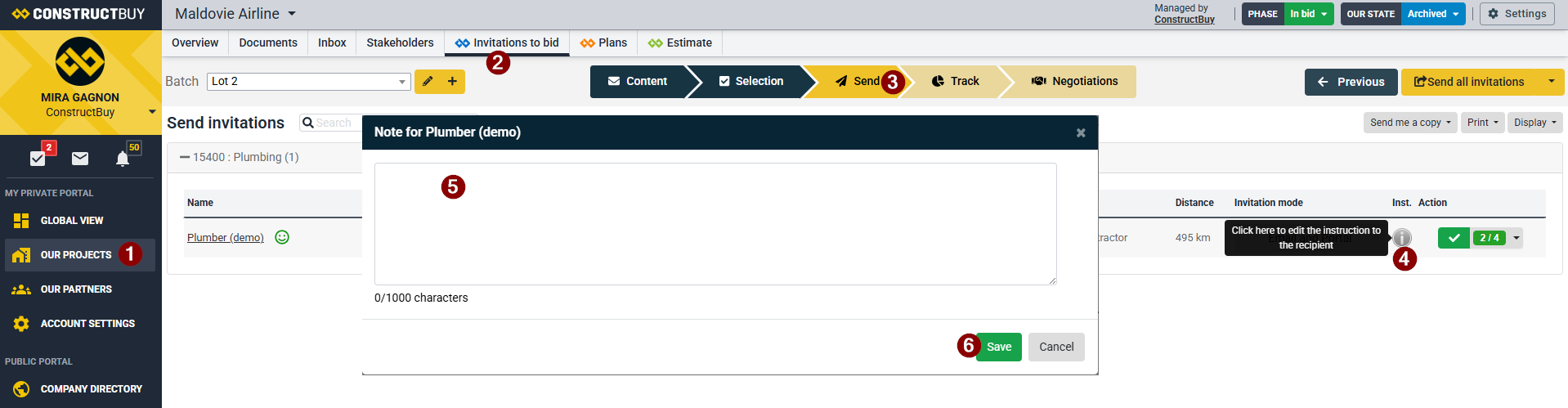
In BID, you can add custom instructions for individual subcontractors when sending an invitation to bid. Follow the steps below:
-
Open the project in ConstructBuy.
-
Go to the Invitations to bid tab.
-
Select the Send step at the top of the page (after selecting the partners you want to invite).
-
Click the "i" icon in the "Inst." column next to the partner for whom you want to add a custom instruction.
-
Enter the custom instruction. (If the instruction refers to a specific file that has been published in the project, you can include the file path(link) so the subcontractor can easily locate it.)
-
Click Save.
When you send the invitation to bid, the custom instruction will be included in the invitation email sent to that partner.