
-
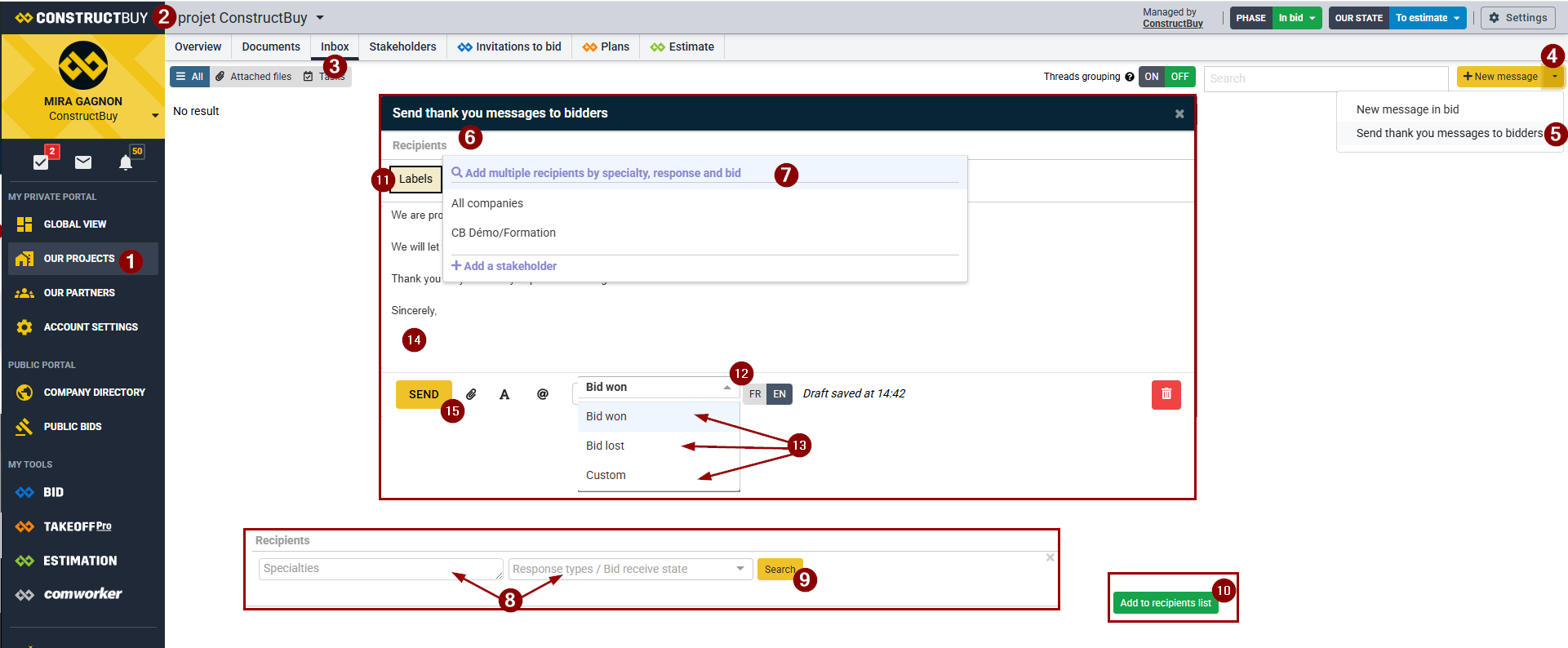
From your ConstructBuy account, go to your private portal.
-
Make sure you are in the project for which you want to send a thank-you message.
-
Go to the project's Messaging section.
-
Click the arrow to the right of + New Message.
-
Select Send a Thank-You Message to Bidders.
-
In the message window that opens, click Recipients.
-
Click the magnifying glass icon and select Add Multiple Recipients by Trade, Response, and Price Received.
-
Select the filters you want to use to identify the project bidders who should receive the message. You may use both types of filters or only one.
-
Filter by Trade (you can select multiple trades at once).
-
Filter by Response and Price Received (you can select multiple options at once).
-
-
Click Search.
-
Verify that all organizations with a checkmark are the ones you want to send the thank-you message to.
-
Select a label for the message. This helps organize your messages and is required before the message can be sent.
-
Click the arrow to the right of Winning Bid.
-
Choose an existing template (Winning Bid or Unsuccessful Bid) or select Custom to write a message from scratch. (Existing templates can be used as a starting point and then modified to suit your needs.)
-
Write or edit the message you want to send to the selected project bidders.
-
When you are satisfied with the message and the selected recipients, click Send.